A new service page can look ready to publish while its source still carries a noindex directive or lacks a title tag. The ScrapePlaces Website SEO Checker reads the page and organizes technical findings into critical, important, and minor items. Each finding explains what the checker saw and what you can change.
What the checker reviews
Paste the exact URL, sign in to ScrapePlaces, and run the check. The report looks at indexing directives, HTTPS, the title and description, headings, mobile viewport, the canonical URL, and other page details. It also reads the site's robots.txt when available and tries a limited sample of internal links.
Choose a page that matters to the business, such as a service or location page. Its findings can differ from the homepage. Start with anything that could prevent the intended page from appearing in search, then work through the remaining items.
Real example from a university admissions page
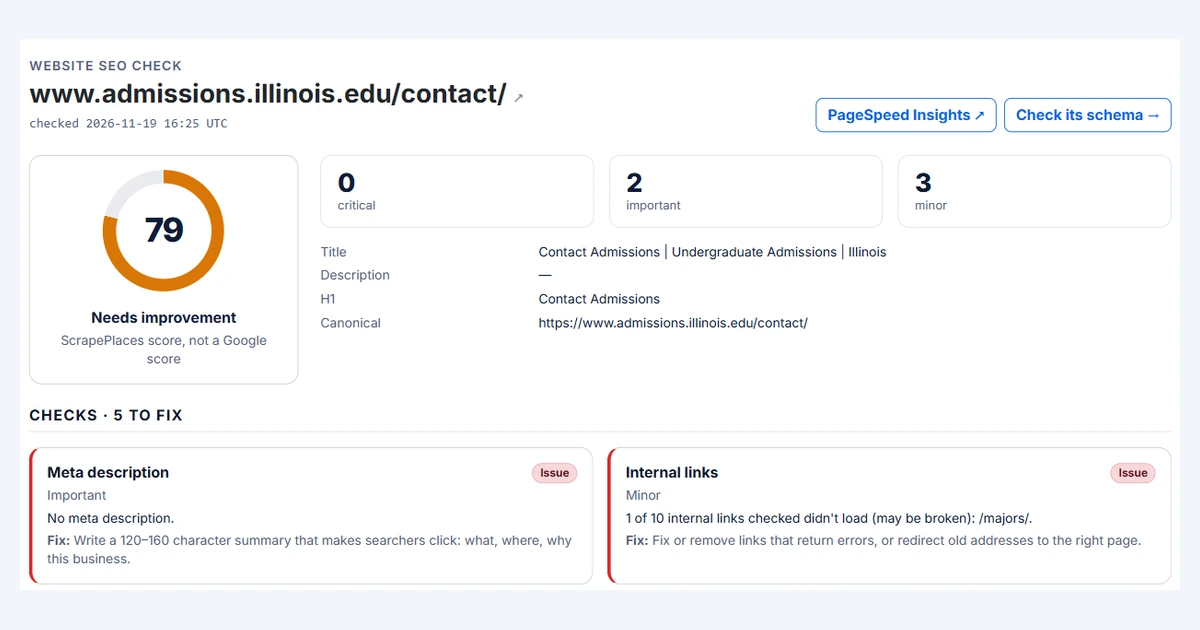
On November 19, 2026, we checked the University of Illinois Urbana-Champaign’s admissions contact page. ScrapePlaces scored the page 79 and reported zero critical, two important, and three minor issues. Illinois Undergraduate Admissions contact page
| Check | Finding from the report | Next step |
|---|---|---|
| Meta description | The checker found no meta description. | Add a short summary of the admissions office and how it helps applicants. |
| Internal links | One of ten sampled links, /majors/, did not load during the check. |
Open the destination in a browser and confirm how it behaves before changing the link. |
| Canonical URL | The page's canonical points to its own contact URL. | Keep it if this is the preferred address. |
| Social sharing tags | The checker found no Open Graph title or image. | Add those tags if the office wants a consistent preview when people share the page. |
Start with the issues you can confirm on the page. A link can fail during a check for several reasons, so open it before treating it as broken. The score summarizes ScrapePlaces’ checks for this URL on that date.
How it compares with industry tools
Screaming Frog SEO Spider crawls sites and helps audit issues across many URLs, including redirects, duplicate metadata, and internal links. Use it when you need a sitewide inventory or want to track a problem across page templates.
Google PageSpeed Insights focuses on page performance and includes lab data and real-user data when available. Use it when the question is how quickly the page loads or responds for visitors.
Use ScrapePlaces when you want a short, prioritized list of technical fixes for a specific page. Run it again after the changes to check the same URL.
Run a Website SEO Check on your homepage or a key service page.