A business can have a phone number in its footer, a general inbox on its contact page, and an enquiry form for partnerships. The right choice depends on why you're reaching out. The ScrapePlaces Business Contact Finder collects the contact options a company publishes on its own website and shows you where it found them.
What you'll see in the report
Enter the company's public website, sign in to ScrapePlaces, and run the lookup. The finder reads the page you entered and a small number of related pages. It can return published email addresses, clickable phone links, social profiles, and links to contact, about, or team pages. For a website that lists one address in several places, the report groups the address and shows the source pages.
Open a source page before acting on a result. It can tell you whether the address is for bookings, support, or another purpose. A published address can also change, so check the source again when the result matters.
Real example from a university admissions office
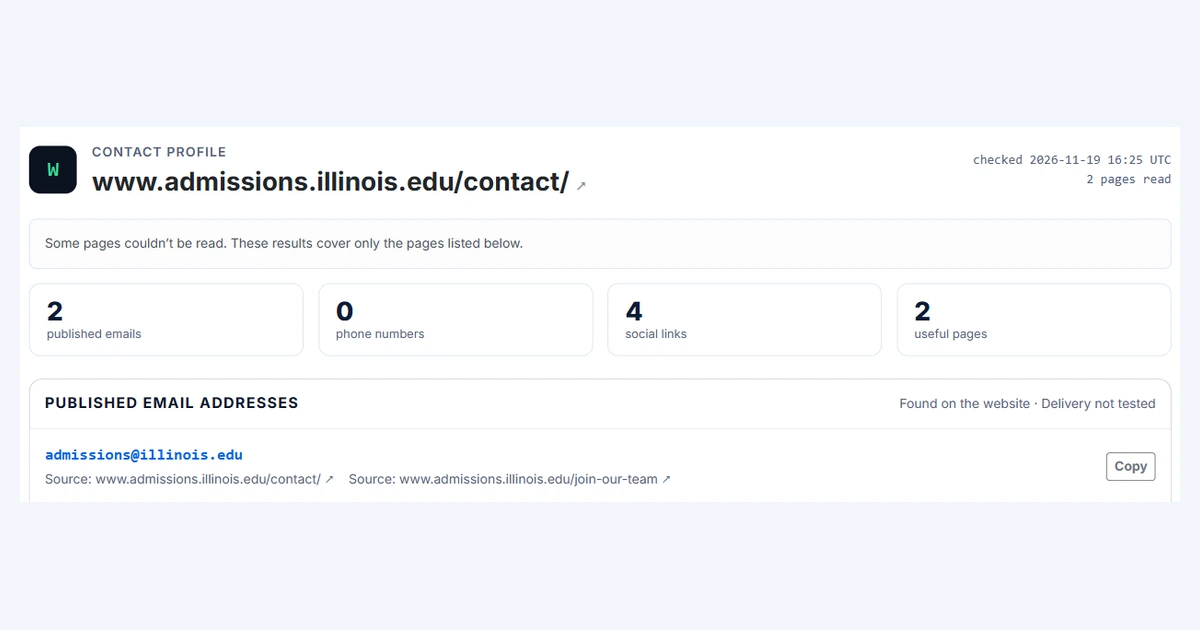
On November 19, 2026, the finder read two pages after we entered the University of Illinois Urbana-Champaign’s admissions contact URL. The report marked the results as partial and showed where it found the public office inbox. Illinois Undergraduate Admissions contact page
| What we checked | What we found | Source |
|---|---|---|
| Admissions inbox | admissions@illinois.edu |
The report linked two pages, including Contact Admissions. |
| Social link | Illinois Admissions on YouTube | Contact Admissions page |
| Social link | University of Illinois on Instagram | Contact Admissions page |
| Contact page | Contact Admissions | Published link shown in the report |
| Office phone | 217-333-0302 | The university lists it on the contact page. The report found zero clickable phone links. |
The source page explains which enquiries go to the general admissions office and where schools should send application materials. Read it before choosing a contact route. The phone number is also a good reason to open the source even when a report shows zero phone links.
Some businesses publish a form without an email address. Contact Finder shows what it could read, and mailbox deliverability requires a separate verification step.
How it compares with industry tools
Hunter Domain Search searches a broader index of web sources. Depending on availability, it can show professional email addresses, names, job titles, source dates, and verification indicators. It is a useful option when you need to look for a specific person or use email verification in your workflow. Apollo People Search serves a different starting point. You can search its contact database by criteria such as job title, location, and company size.
Use ScrapePlaces when you already know the company's website and want to see the contact routes the company itself publishes. That is especially useful for local businesses where the best first step may be a general inbox or an enquiry form.
Try the Business Contact Finder with a company you already know.